
APK Easy Tool is a popular Windows application that can organize, compile, and compress your APK files more easily.
Table of Contents
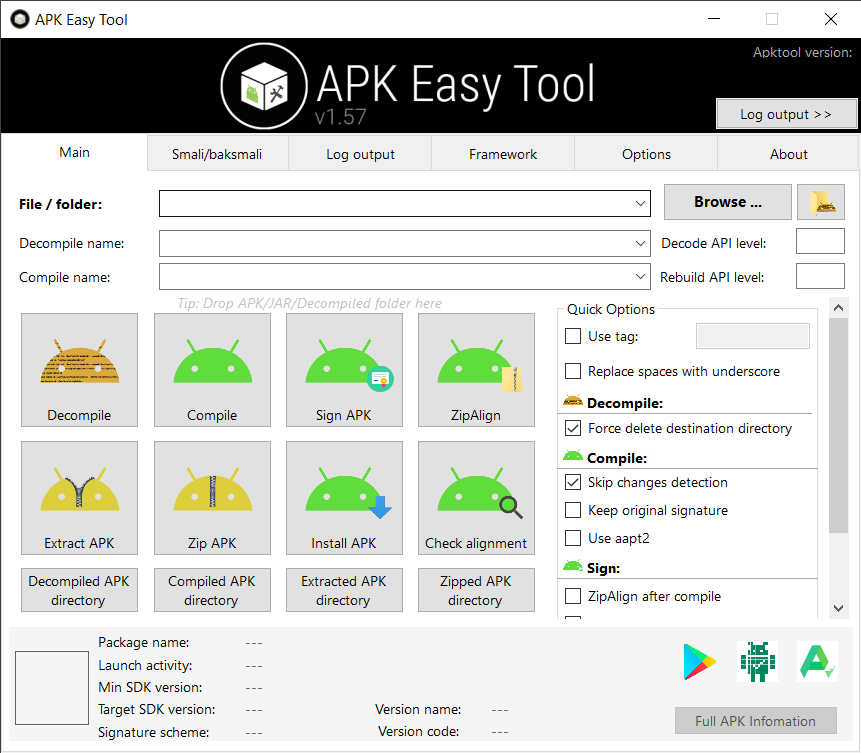
With this awesome GUI application, you can easily work with multiple formats. It offers tons of features and usability for every user. The interface is very user-friendly, and you can find everything at a glance.
You can find more functionalities on the tab menu and customize the looks slightly. As this software is for programming, you won’t find any unnecessary junk.
Easy Compilation
This handy tool is built for seamless compilation functions. Decompile and compile JAR, DEX, and APK files, with characters, symbols.
Support for Other Version
The app lets the users change apktool.kar file options for better usability. Add or remove other file options from the “Apktool” folder.
Useful Information of Your Files
Option to know about your external app files with full details. The symbol uses aapt dump function to provide an external link to Play Store.
Sign & Compress
Signing your apps is as simple as it can be. The ability to cancel during its operation is also an added benefit. You can use the app’s feature to zip or extract and also do it using WinZip or WinRAR.
Log Search
Using your logs to find out any bugs and errors is just sweet! Your APK files will face no issue anymore.

Framework Access
Access the framework tab to open any framework file or paths from your PC.
Drag & Drop
This function is best to easily perform the action for all the files. You can also select the files/folders option while dropping.
FAQ’s About APK Easy Tool
Yes, it absolutely does, you can easily use its drag-and-drop feature to speed up your work.
Yes, you can find the zip or portable file online. From our website, you can easily download it.
No, the application only supports android package files.
Open the app and select the Options menu and look for the General section. Press on the Reset button to return to your factory settings.
No, the application does not release or disclose its source code. You are free to look at some of the GitHub modifications.
Getting started with APK Easy Tool
- First, click on the download button above.
- Run the downloaded file and install it.
- Now lunch the APK Easy Tool.
- Select the APK file you want to work with or just drag and drop your desired APK file on the app.
- You are done, now do some work with it which you want.
Conclusion
This free and awesome APK Easy Tool is the perfect way to start your android package management. App info, multiple formats, OS support, a cost-free version, and tons of other features make it unique. The app lets any user feel free to customize their files on the go.
Our Usage
This awesome tool really helped us a lot in compiling and extracting an APK file, though it has more awesome features. Because for our work, we don’t need each of them. But the features we have used of it were really great for our work.
 Cisco Packet Tracer
 Postman
 Visual Studio Code
 Microsoft Visual C++ Redistributable
 Notepad++
 WordPress