
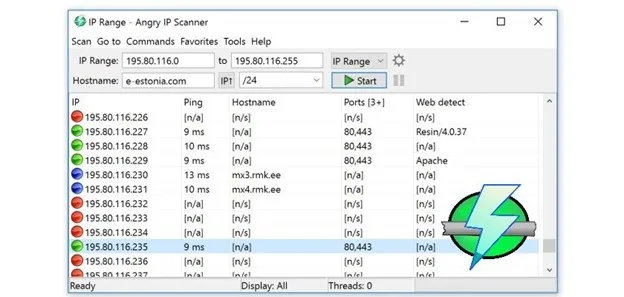
Angry IP Scanner is a free, open-source network scanning tool that is used to discover and scan IP addresses and ports on a computer network. It allows users to scan an IP range or a list of IP addresses and ports to identify live hosts and open ports, as well as gather information about the host, such as the hostname and operating system.
Table of Contents

This scanner application can be run on Windows, Linux, and macOS. It is commonly used by network administrators and security professionals to discover and assess network security vulnerabilities, as well as by individuals to troubleshoot network issues or find open ports on their own devices.
Features of Angry IP Scanner
Fast Scanning Speed
It is known for its fast scanning speed, making it ideal for large networks. On top of that, you can specify a range of IP addresses to scan, or exclude specific IP addresses from the scan. Oh! Did I forget to mention Custom port scanning?
You can specify a range of ports to scan, or specify specific ports to scan. So, you get full freedom while scanning for new networks around you.
Support for Various protocols
Angry IP Scanner supports various protocols, including TCP, HTTP, HTTPS, FTP, and more. Also, compatibility won’t be an issue as the software is available on Windows, Linux, and MacOS.
Command-line interface
The user interface of Angry IP Scanner is as versatile as you want it to be. You can customize and with downloadable themes and plugins to match your preferences. In addition to the graphical user interface, this software also has a command-line interface for users who prefer to use a terminal.
Detailed Results
The scan results include detailed information about each network device, such as the IP address, hostname, MAC address, and open ports.
How do I install Angry IP Scanner?
Faced trouble while installing the application? Here are the steps that you can follow to properly install it-
- Download the latest version of Angry IP Scanner from the project’s website.
- Open the downloaded file and follow the instructions to begin the installation process.
- Accept the terms of the software license agreement and click “Next” to continue.
- Choose the destination folder where you want to install it and click “Next” to continue.
- Click “Install” to begin the installation process.
- Wait for the installation to complete, and click “Finish” to complete the installation process.
Once the installation is complete, it will be available on your computer and you can start using it to scan IP addresses and ports on your network.
Note: If you are installing Angry IP Scanner on a Windows machine, you may need to have administrator privileges to install the software.
FAQs about Angry IP Scanner
Is Angry IP Scanner Legal?
In most cases, using an Angry IP Scanner to scan a network or networked devices for which you have permission to access is legal. However, using the tool to scan networks or devices without permission may be considered illegal in some jurisdictions, depending on the specific laws and regulations in place.
Is it free?
Yes, it is a free, open-source tool. It is available for download from here. Users are not required to pay any fees to use the software.
Conclusion
In the end, Angry IP Scanner is definitely a great application that you can regularly on your computer to scan other networks. However, always keep in mind that the usage of such applications can be risky if you don’t follow the proper guidelines.
With that said, download the Angry IP Scanner for freeform here!
 Revo Uninstaller
 MEmu
 15 Seconds ADB Installer
 Veeam Agent
 Vysor
 DLL Suite